● In short
- Ordinary CCTV and phone cameras are enough for most process-monitoring and measurement tasks.
- Define violations as concrete, visible events — “no gloves at the prep station” — not as abstract quality.
- The product is the alert feed, not the model: fewer, well-timed alerts beat a dashboard nobody opens.
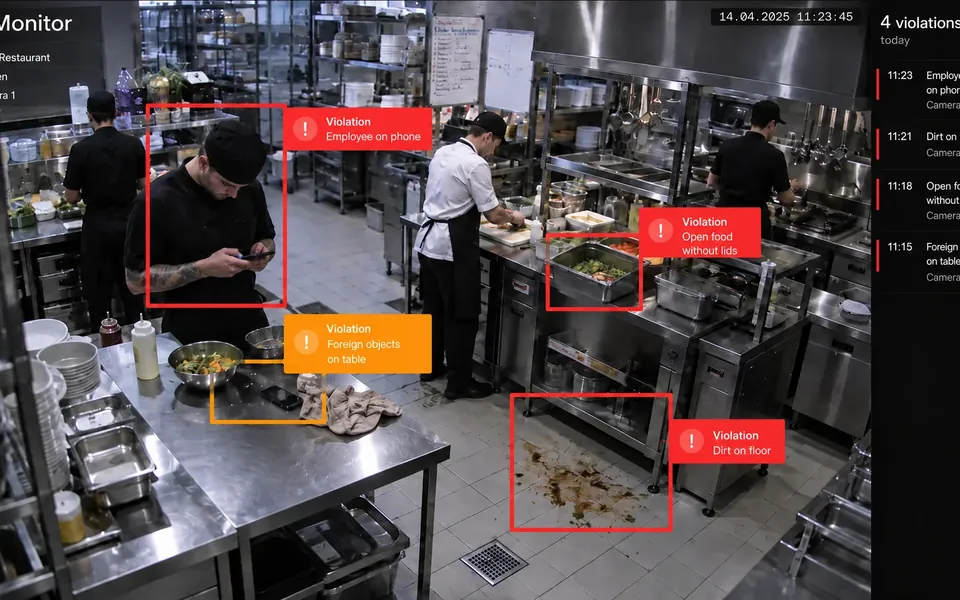
Two of our projects sit at opposite ends of the camera spectrum. Monitor watches a restaurant's dining room and kitchen through the CCTV that was already installed. SizeMyShoe measures a foot from a single photo taken on whatever phone the customer owns. Neither required a single new device, and both changed how a process runs. Here is what we learned about making computer vision work with the hardware people already have.
Start with events, not with “quality”
“Monitor service quality” is not something a model can learn. “A staff member at the prep station without gloves”, “a table not cleared within ten minutes after guests leave”, “food left uncovered on the pass” — those are events. Each one is visible, has a clear start and end, and someone in the business already cares about it.
We spend the first days of a vision project writing this list with the people who run the floor. It usually has ten to twenty items; we pick the three or four that are both frequent and costly, and build for those first.
What ordinary cameras can and can't do
Typical installed CCTV is wide-angle, mounted high, compressed hard and often pointed at the till rather than the work. That's fine for detecting people, objects, presence and absence, and rough positions. It is not fine for reading small text, judging fine textures or spotting a hair in a dish.
- Good fit: PPE and uniform checks, occupancy and queue length, objects left where they shouldn't be, whether a station is staffed, dwell times.
- Needs a closer camera: label and badge reading, small defects on products, hand-level hygiene steps.
- Usually not worth it: anything that depends on colour accuracy under mixed lighting, or on details smaller than a few pixels at the camera's real resolution.
When a task falls in the middle column, the honest answer is often one extra camera at one station — not a new system.
Phone cameras are a different problem
With SizeMyShoe the camera is in the customer's hand, so the variables flip: the angle, distance, lighting and background change with every photo. The model has to be robust to that, but the interface does half the work. A clear on-screen guide for how to place the foot and phone removes most of the bad inputs before they reach the model. A measurement that can tell the user “retake the photo, the heel is cut off” is more valuable than one that silently guesses.
A vision system is judged by the alerts it sends, not by the boxes it draws.
Design the alert feed first
Most vision pilots we've seen die in the same way: the model works, the dashboard is full of detections, and nobody looks at it after week two. The fix is to treat the alert as the product.
- Group repeated events. One “no gloves at station 2” for a five-minute stretch, not three hundred frames.
- Send it where people already are. A messenger channel or the shift manager's tablet, not a new web app with a login.
- Attach the frame. A single image with the event highlighted ends arguments faster than any confidence score.
- Make it easy to mark false alarms. One tap, and that example goes into the next round of training.
In Monitor the result is a feed where a violation shows up within the minute — in time to fix it during the shift, rather than in a monthly report.
Measure it against the old way
The current way of catching violations is usually a manager walking the floor or an inspector with a checklist once a month. That is the baseline. During the pilot we log every event the model reports and, for a sample of shifts, every event a human checker notices. The comparison answers three questions that decide whether the system stays:
- Recall: of the violations a careful human would have caught, how many did the model catch?
- Precision: of the alerts the model sent, how many were real? Below a certain level people stop reading them.
- Latency: how long from the event to someone fixing it? This is usually where the biggest gain is — minutes instead of weeks.
The point isn't to prove the model is perfect. It's to show that the shift manager now sees things in time to act, without spending the day watching monitors.
Privacy is part of the design
Cameras pointed at staff and guests raise fair questions. We keep processing on site or in the client's cloud where possible, store event frames rather than continuous footage, blur faces when the task doesn't need identity, and agree retention periods up front. Telling staff exactly what is detected — and what isn't — also turns out to be the best way to get the system accepted on the floor.
Where to start
Pick one location, one camera view and three events. Run the model alongside the current way of checking for two weeks and compare what each caught. If the numbers are convincing, scaling to more cameras is mostly configuration.
Case · Quality control · CV
Monitor
AI computer vision watches work processes on ordinary cameras — deviations show up the moment they happen